






 V4.5, Aug. 2014 (jar archive including Java source code)
Previous MARS version: MARS v4.4, Aug. 2013
Download MARS from Softpedia
(version on Softpedia may lag behind the version on this page). Feb. 2013: "MARS has been tested in the Softpedia labs
using several industry-leading security solutions and found to be completely
clean of adware/spyware components. ... Softpedia guarantees that MARS 4.3 is 100% FREE,
which means it does not contain any form of malware, including spyware, viruses, trojans and backdoors."
Feb. 2013: "MARS has been tested in the Softpedia labs
using several industry-leading security solutions and found to be completely
clean of adware/spyware components. ... Softpedia guarantees that MARS 4.3 is 100% FREE,
which means it does not contain any form of malware, including spyware, viruses, trojans and backdoors."
Option A: Desktop. Save the jar file on the desktop. Run MARS by double-clicking the icon.
Option B: DOS shell using jar file. Save the jar file in some folder. Open a DOS shell in that folder. Rename the jar file to "Mars.jar" for convenience. Run MARS with the DOS command java -jar Mars.jar
Option C: DOS shell using Java classes. Save the jar file in some folder. Open a DOS shell in that folder. Rename the jar file to "Mars.jar" for convenience. Extract MARS files with the DOS command jar -xf Mars.jar Run MARS with the DOS command java Mars
As of V4.0, MARS requires Java J2SE 1.5 (or later) SDK installed on your computer.

Sample MIPS assembly program to run under MARS Fibonacci.asm
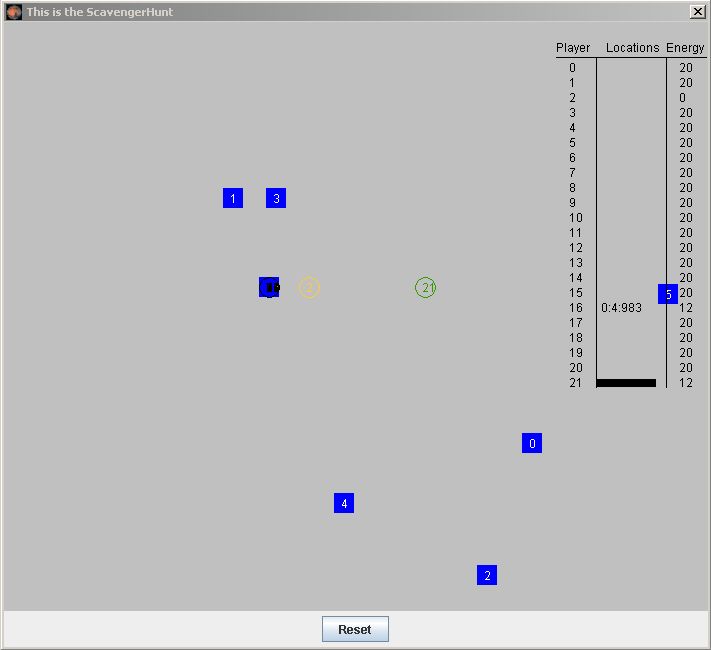
A "tool" is the MARS utility for MIPS control of simulated devices, including contention for resources. Sample tool is a Scavenger Hunt (screeenshot 23KB), in which each student writes a MIPS subroutine to direct the path of a character to travel to several locations. The companion Java "tool" program graphically displays the position of each character as the Scavenger Hunt game progresses. Interested instructors please contact Ken Vollmar for MIPS assembly solution or further information.